Hyperliquid 3 Min Log Return (Topic 90) brings high-frequency log return predictions to the Allora Forge. Every 3 minutes, inference workers submit predictions over a three-minute time interval for a broad cross-section of the Hyperliquid perp market. The Allora inference network aggregates these into a synthesized prediction for each asset, designed to outperform the individual constituents over time. The Allora whitepaper explains how inference synthesis works.
Directional short-term alpha signals are an integral part of many execution and market making operations. For detailed background on how short-term directional predictions integrate with high-frequency market making systems, see Álvaro Cartea, Sebastian Jaimungal, and José Penalva, Algorithmic and High-Frequency Trading, Cambridge University Press, 2015. Sourcing these predictions through Allora makes this step easier for consumers and enables our community to deliver the secret sauce and earn.
Multi-output Topics
Allora’s recent network upgrade enables multi-output topic types. Instead of one topic per asset, we can now group many assets into a single topic. For topic 90, workers submit labeled arrays, where each element corresponds to a three-minute log return prediction for an asset.
In the Python example, your prediction callback returns a dictionary, and the SDK handles the labeled submission:
predictions = {
    "btc": 0.00042,
    "eth": -0.00018,
    "sol": 0.00073,
}
These are illustrative log returns, not prices or probabilities: 0.00042 is approximately a +0.042% price move. Labels are lowercase asset names such as btc and eth.
Since this is a new blockchain rollout, we’ve capped each submission at 100 asset labels. Aim to submit the 100 assets with the most trailing 30-day volume. Workers will be scored on the top 90. If an asset is unavailable for a round, submit the predictions you do have; one missing asset shouldn’t kill the whole inference.
Data
Allora is now serving and supporting the Hyperliquid universe with one-minute OHLCV candle data through Atlas, our in-house data platform. At any time you can discover the universe through the dedicated current_hl_universe dataset:
curl -fsSG 'https://forge-data.allora.run/api/rows/' \
  -H "X-API-Key: $ALLORA_API_KEY" \
  --data-urlencode 'dataset_name=current_hl_universe' \
  --data-urlencode 'limit=1000' |
jq '[.results[].values
  | select(.status == "consumable" and .market_group == "perp")
  | .candle_dataset_name] | sort'
This returns Atlas identifiers such as hl_btc_1min and hl_eth_1min. The market_group == "perp" filter keeps us in the native perp universe and excludes XYZ markets.
We’ve also extended the Atlas rows API to receive updates for multiple assets at the same time. That means one HTTP request for the batch, instead of a separate request per ticker. In our example runs, a routine refresh across roughly 178 assets took about 0.4 seconds, including the in-memory cache update. The full inference pass took a few seconds; transaction submission adds its own time.
For example, this requests the latest minute candle for both BTC and ETH:
curl -fsSG 'https://forge-data.allora.run/api/rows/' \
  -H "X-API-Key: $ALLORA_API_KEY" \
  --data-urlencode 'dataset_names=hl_btc_1min,hl_eth_1min' \
  --data-urlencode 'limit=1' \
  --data-urlencode 'ordering=-timestamp'
The response groups rows by dataset. Here is a shortened BTC row from an actual response, with metadata and the ETH group omitted:
{
  "dataset_id": 1196859,
  "timestamp": "2026-10-09T17:19:00Z",
  "values": {
    "open": 82615, "high": 82623, "low": 82614, "close": 82622,
    "volume": 0.08883, "num_trades": 12
  }
}
The timestamp is the candle’s opening time. The latest row may still be a partial candle. Increase limit to request more rows per asset, which is useful for refreshing an overlapping slice of recent history.
Builder kit integration
Corresponding to the new Atlas data endpoint, we’ve extended the Atlas data manager with some convenience methods.
AtlasDataManager.discover_hl_universe(): Atlas-specific discovery returning a list of exact dataset names for fresh, consumable native perps.AtlasDataManager.get_bulk_1min_candles(symbols, limit=10): one multi-dataset HTTP request returning raw minute candles with asset identity preserved.
The ML workflow still works as before. Users configure AlloraMLWorkflow, call backfill() and get_full_feature_target_dataframe(), train models, evaluate through PerformanceEvaluator, and save serialized artifacts for the existing deployment flow.
The workflow already accepts multiple tickers, produces a dataframe indexed by ticker and time, shares historical/live feature extraction, and dispatches target construction through target_type.
Keep target_type="log_return". Existing multi-ticker historical dataset construction supplies the required training data with interval="3m" and target_bars=1. The following short snippet creates data, containing the input features and target for supervised ML:
import os
from pathlib import Path
import pandas as pd
from allora_forge_builder_kit import AtlasDataManager, AlloraMLWorkflow

LOOKBACK = 10  # Configurable number of past three-minute candles.
end = pd.Timestamp.now(tz="UTC").floor("3min")
start = end - pd.DateOffset(months=6)
atlas = AtlasDataManager(
    api_key=os.environ["ALLORA_API_KEY"],
    base_dir=Path("data"),
    interval="3m",
)
universe = atlas.discover_hl_universe()
workflow = AlloraMLWorkflow(
    tickers=universe,
    target_type="log_return",
    interval="3m",
    target_bars=1,
    number_of_input_bars=LOOKBACK,
    data_manager=atlas,
)
workflow.backfill(start=start)
data = workflow.get_full_feature_target_dataframe(start_date=start, end_date=end)
The full example builds this dataset one asset at a time to reduce peak memory, removes unusable rows, and splits it chronologically before training.
Training and live inference
Training uses fixed, non-overlapping three-minute candles. The default input is a window of past normalized candles and the target is the close of the next unobserved candle, expressed as a log return. We pool the rows across tickers to train one model for all assets. The example uses one chronological holdout, keeping the latest 20% of observed timestamps for validation and excluding training labels that resolve after that boundary.
The example gives a light randomized search over LightGBM parameters, using six months of available historical data. In our October 8 run with a 10-candle lookback, that produced about 11.70 million training rows and 3.05 million validation rows across 178 assets. Counts depend on available history and your lookback. Tree-count checkpoints let us compare smaller and larger models without restarting each fit. The top three distinct trials are selected by lowest validation MSE, retrained on all usable data, and exported for live inference.
Our leading model passed five of the seven criteria in the pooled offline validation report, with participation assumed to be full. That’s a starting point, and this is where our community is going to help push the needle. These are validation results used during model selection; live performance is the next test. The example also reports metrics per asset and their equal-weight averages so we can compare that view with pooling all the data together.
Since inference workers are queried asynchronously, the current network scoring adopts the following conventions.
Inference resamples the historical one-minute data to the target start. Let T be the minute boundary starting the evaluation interval; the target ends at T + 3 minutes. Build the input bars backward from T so the final completed three-minute bar ends exactly at T. This aligns the live prediction with our training setup.
Example: the submission window opens at 12:01:27 UTC. The target starts at the preceding minute boundary, 12:01:00, and ends at 12:04:00. At window opening, 27 seconds of that target interval have already elapsed. The approximately 30-second submission window closes around 12:01:57; the prediction horizon still ends at 12:04:00.
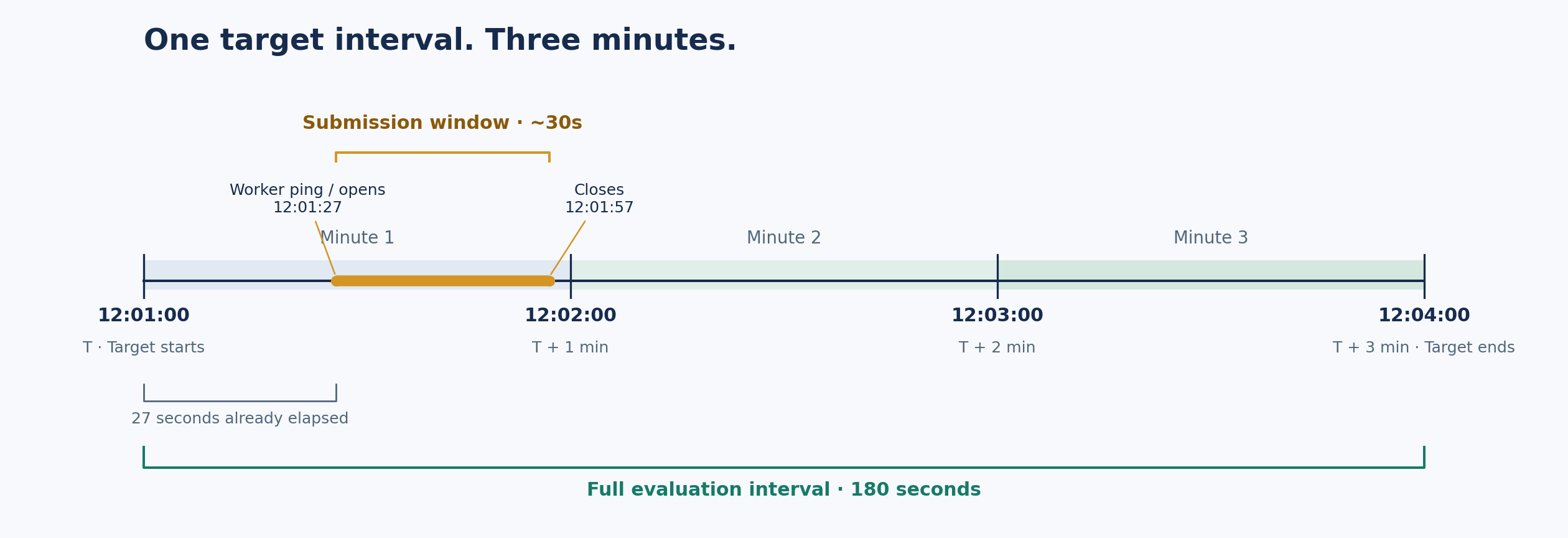
The last completed input candle is labeled 11:58, covering [11:58, 12:01). The 12:01-labeled candle is separate: if Atlas has it, its latest close tells us how much the price has already drifted since the target started. The worker adds that realized log return to the model’s prediction. Each asset is checked independently; if its partial candle is missing, the worker assumes zero drift for that asset.
The worker keeps recent minute candles in memory, tops them up before opening the listener, and refreshes them in bulk when queried. Our example waits ten seconds before that refresh to let newer Atlas updates arrive, leaving roughly twenty seconds for prediction and submission. The target boundary stays fixed throughout.
The logic for adjusting raw candles for inference in real time has been designed and implemented in the topic 90 working example, in the Allora Forge Builder Kit.
Deploy
The example exports the top three models found during hyperparameter search. Then use the WorkerManager for deployment and monitoring:
python notebooks/testnet/topic_90_hyperliquid_3min_logreturn/deploy_managed_example.py \
  --model-run notebooks/testnet/topic_90_hyperliquid_3min_logreturn/results/model_search/RUN_TIMESTAMP \
  --deploy
Replace RUN_TIMESTAMP with the run directory printed by the training script. WorkerManager allocates one address per model and starts each worker with its own in-memory data buffer. The workers keep running after the launching terminal closes. Use python -m allora_forge_builder_kit.workerctl dashboard to monitor them.
Contributing
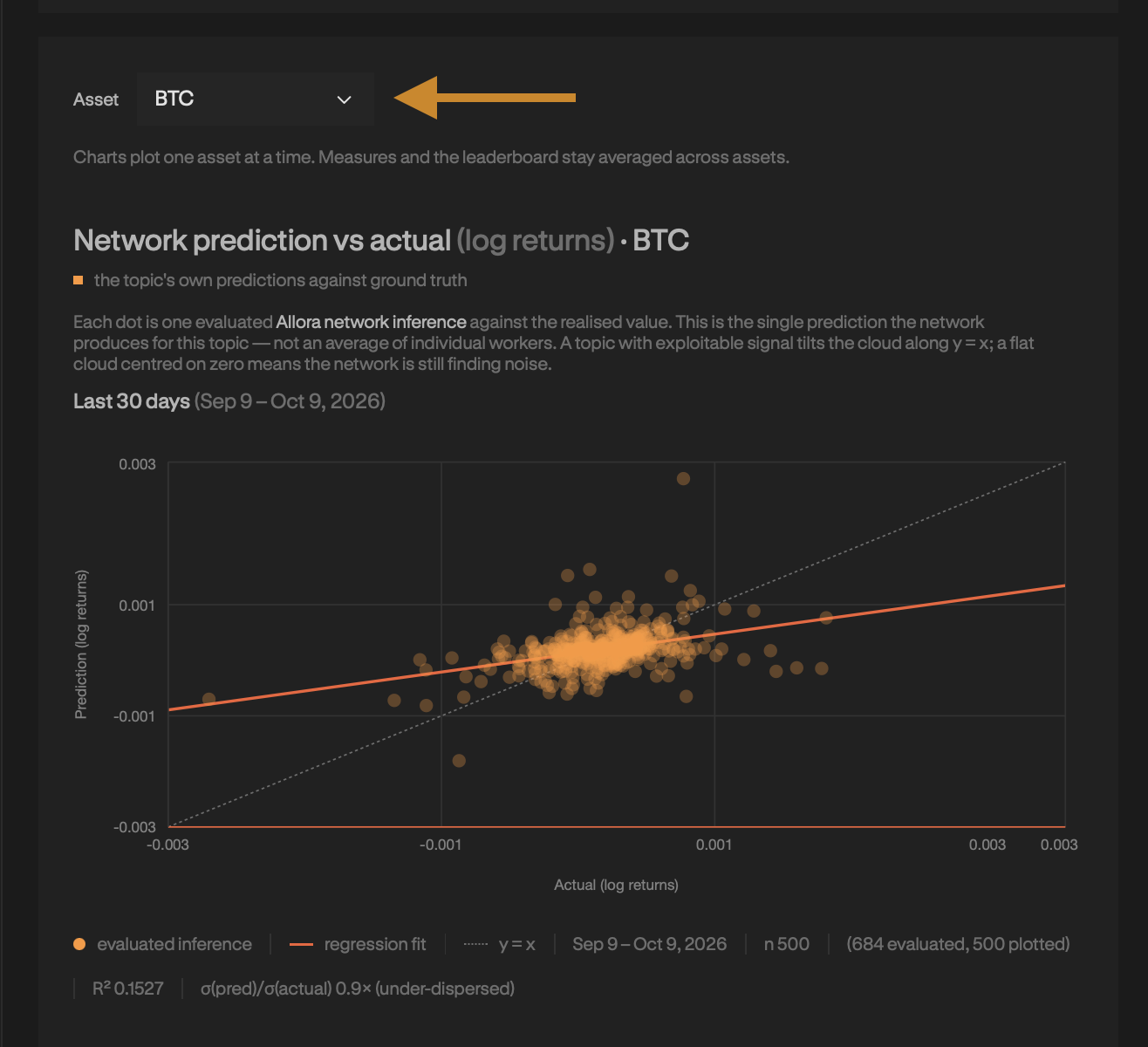
The new topic can be found on the Allora Forge. Use the ticker dropdown to switch between assets and explore their predictions, all within the same topic.
Sign up to the Forge, grab an API key from the developer portal, and clone the Allora Forge Builder Kit. The getting started guide introduces the Forge, and the topic 90 walkthrough in the README takes you through backfilling, training, and deploying this example.
Start with the working example, try your own features and models, and bring your predictions to the network. We’re providing the data and a working path to submission. The secret sauce is yours.
.png)